libphash
Perceptual image hashing in C. Nine algorithms that turn an image into a short fingerprint, so that a resized copy, a recompressed JPEG or a slightly brighter version of a picture lands a few bits away from the original, while an unrelated picture lands about half the bits away.
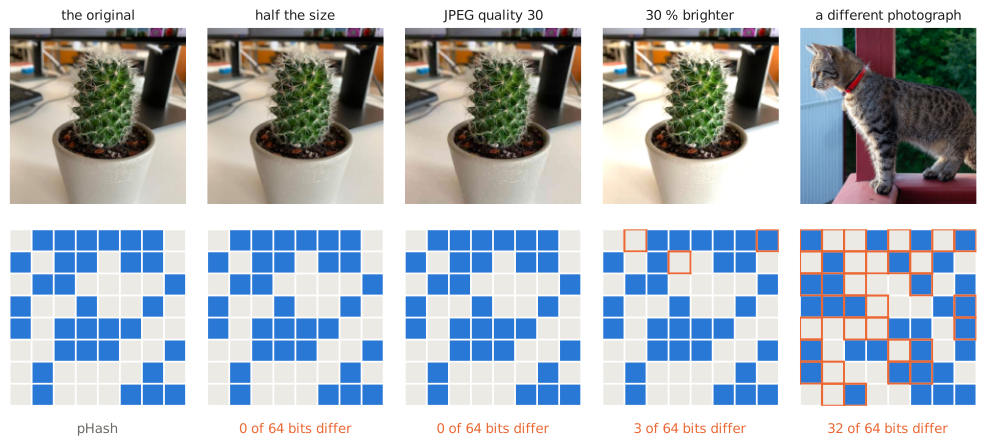
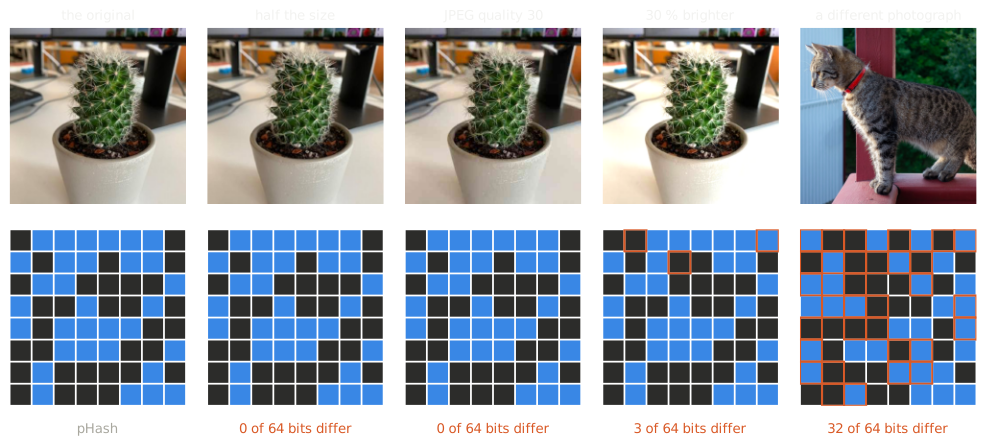
Above, pHash as the library computes it: the copies keep the original's hash, or nearly, and the unrelated photograph differs in about half of the 64 bits, which is what two unrelated hashes do by chance. The same file gives the same hash on Linux, macOS and Windows, on x86-64 and arm64, in any build with the same JPEG decoder.
The numbers behind the picture
| Picture | pHash | Bits that differ from the original |
|---|---|---|
| the original | 7eb66192bc394247 |
0 |
| half the size | 7eb66192bc394247 |
0 |
| JPEG quality 30 | 7eb66192bc394247 |
0 |
| 30 % brighter | 3fa66192bc394247 |
3 |
| a different photograph | 954ac5e30db58e27 |
32 |
The copies are three of the edits every algorithm's page measures; the cat is a file of the photo corpus.
-
Start in five minutes
Install a prebuilt archive or build from source, then hash and compare your first images.
-
Understand the idea
What a perceptual hash keeps of an image, what it throws away, and what it cannot be trusted with.
-
Pick an algorithm
The nine measured side by side, on photographs and on synthetic images: which edits each survives, how well it tells pictures apart, and what it costs.
-
Pick a threshold
Which function compares which hash, and how far apart two hashes may be and still be the same picture.
-
Hash a whole collection
Many files across a pool of workers, then storing the hashes and searching them.
-
Look up a function
Every public function, type and error code, generated from
libphash.h.
What it looks like
/* Loads an image and prints its pHash. Build/run:
 *   cc basic_hash.c -o basic_hash $(pkg-config --cflags --libs libphash)
 *   ./basic_hash path/to/image.jpg
 */
#include <libphash.h>
#include <stdio.h>

int main(int argc, char **argv) {
    if (argc != 2) {
        fprintf(stderr, "usage: %s <image>\n", argv[0]);
        return 1;
    }

    ph_context_t *ctx = NULL;
    if (ph_create(&ctx) != PH_SUCCESS) {
        fprintf(stderr, "ph_create failed\n");
        return 1;
    }

    /* Fast grayscale loading: skips the RGB-to-gray conversion pass. Fine here since
     * pHash only ever operates on grayscale; skip this call to load in color if you
     * also want a color hash (ph_compute_color_hash(), ph_compute_color_moments_hash())
     * from the same load. */
    ph_context_set_load_grayscale(ctx, 1);

    ph_error_t err = ph_load_from_file(ctx, argv[1]);
    if (err != PH_SUCCESS) {
        fprintf(stderr, "failed to load %s: %s (%s)\n", argv[1], ph_get_error_string(err),
                ph_get_last_error_message(ctx));
        ph_free(ctx);
        return 1;
    }

    uint64_t hash = 0;
    err = ph_compute_phash(ctx, &hash);
    if (err != PH_SUCCESS) {
        fprintf(stderr, "ph_compute_phash failed: %s\n", ph_get_error_string(err));
        ph_free(ctx);
        return 1;
    }

    char hex[17];
    if (ph_hash_to_hex(hash, hex, sizeof(hex)) != PH_SUCCESS) {
        fprintf(stderr, "ph_hash_to_hex failed\n");
        ph_free(ctx);
        return 1;
    }
    printf("pHash: %s\n", hex);

    ph_free(ctx);
    return 0;
}
What it is for, and what it is not
For finding duplicate and near-duplicate images in a collection you control: deduplicating an archive, clustering a catalog, keying a cache, answering "have I stored this before" inside a trusted pipeline.
Not for anything where someone benefits from a wrong answer. Every hash here is deterministic and unkeyed, which is what makes deduplication work and also what makes the hashes straightforward to defeat on purpose. Content moderation, copyright blocklists and integrity checks on untrusted input need keyed algorithms, and none is implemented here. The reasoning and the citations are in the threat model.
Nine algorithms, one pipeline
flowchart LR
    A[File or buffer] --> B[Decode]
    B --> C[Orient, grayscale]
    C --> D[Reduce]
    D --> E1[aHash · dHash · pHash · wHash<br/>64-bit hash]
    D --> E2[mHash · BMH · Radial<br/>digest]
    B --> E3[ColorHash · ColorMoments<br/>color digest]
The four 64-bit hashes are compared by Hamming distance; the others return a digest with its own distance function. How libphash works follows an image through these steps; each algorithm has its own page under Theory.
Performance
Decoding a JPEG, and each hash at its defaults on the decoded image, one thread1:
| 400×400 JPEG | 5472×3648 JPEG | |
|---|---|---|
| decode | 0.53 ms | 105 ms |
| aHash | 0.21 ms | 22.9 ms |
| dHash | 0.23 ms | 26.9 ms |
| pHash | 0.21 ms | 22.9 ms |
| wHash | 0.21 ms | 22.9 ms |
| mHash | 1.8 ms | 91.2 ms |
| BMH | 0.21 ms | 22.9 ms |
| Radial | 1.4 ms | 120 ms |
| ColorHash | 0.24 ms | 31.2 ms |
| ColorMoments | 0.52 ms | 66.2 ms |
The four 64-bit hashes and BMH cost a small fraction of the decode. mHash and Radial pass a filter over the image, and cost more than decoding a small one; on a large image they and the two color hashes come closest to the decode. Performance has the times against image size and format, and what lowers them.
Also available
- Python: python-libphash
(
pip install python-libphash). - Upgrading from 1.x: some hash values change silently; read Migrating from 1.x first.
-
Measured when this site was built, on Intel(R) Xeon(R) Platinum 8370C CPU @ 2.80GHz, 4 cores, Linux x86_64; compiled by 13.3.0, optimized, with libjpeg-turbo decoding the JPEGs: the minimum of at least five runs after a warm-up. What each time covers, and the code, are under “How this was measured” beside it. ↩