Hashing many files
A collection of images is hashed one image at a time, and the images are independent of
each other: the work divides across threads with nothing to share.
ph_hash_files() and
ph_hash_buffers() take an array of files or encoded
buffers and hash them on a pool of worker threads. This page shows a batch in code, what
the plain call decides for you and how the _ex variants change it, how to read the
results, how many workers to run, measured, and what they hold in memory.
A batch in one call
A batch is an array of items. Each item names its input, a path for
ph_batch_item_t and a pointer and a length for
ph_batch_buffer_item_t, and receives the hashes
and a status. The flags choose among the four 64-bit hashes, aHash, dHash, pHash and wHash,
and each item's hashes holds one value per flag in ascending bit order, as
ph_compute_multi() writes them:
/* One item per file: the path in, the hashes and a status out. */
ph_batch_item_t *items = calloc(n, sizeof(*items));
if (!items) {
    return 1;
}
for (size_t i = 0; i < n; i++) {
    items[i].path = paths[i];
}
/* hashes[] holds one value per flag, in ascending bit order: dHash, then pHash. */
uint32_t flags = PH_HASH_DHASH | PH_HASH_PHASH;
The array has room for PH_BATCH_HASHES_CAPACITY
values, more than the four algorithms need, so that a fifth 64-bit algorithm would not
change the size of an item.
The plain call takes the items, their number, the flags and a thread count, and returns when every item is done:
/* Every file as a freshly created context hashes it, on one worker per CPU this
 * process may use; the call returns after the last file. */
err = ph_hash_files(items, n, flags, 0);
Each worker creates a context of its own, takes the next item no worker has started, loads
it with ph_load_from_file() (or
ph_load_from_memory()), computes the hashes with
ph_compute_multi(), and writes the result into that item and nowhere else. A failure stays
in the item's status and the next item is taken as usual:
flowchart LR
    I[Items] --> N{{Next item<br/>not started}}
    N --> W1[Worker 1:<br/>its own context]
    N --> W2[Worker 2:<br/>its own context]
    N --> Wn[Worker n:<br/>its own context]
    W1 & W2 & Wn --> R[Hashes and status<br/>into that item]
ph_hash_buffers() works the same on encoded bytes already in memory, such as downloaded
files; the buffers stay the caller's and are not copied.
A configuration, progress and cancellation
The plain call decides three things for you:
- The default configuration. Every item is hashed as by a freshly created context:
nothing set with a
ph_context_set_*()function anywhere applies, the default size limit included. For a file whose context you configured, the batch and a single load give different hashes. - No progress and no stop. The call returns after the last item and reports nothing on the way.
- A worker per CPU, when
threadsis 0, each holding an image (Memory).
ph_hash_files_ex() and
ph_hash_buffers_ex() take the same items and flags
and a ph_batch_options_t, filled with its defaults by
ph_batch_options_init() and then changed where
needed:
/* The template context: every worker copies its configuration. Here, images up
 * to 50 megapixels and JPEGs decoded at half size: cheaper on large photos, and
 * other hashes than the defaults give, in a build whose JPEG decoder is
 * libjpeg-turbo. */
if (ph_create(&config) != PH_SUCCESS ||
    ph_context_set_max_pixels(config, 50u * 1000u * 1000u) != PH_SUCCESS ||
    ph_context_set_decode_scale(config, PH_DECODE_SCALE_HALF) != PH_SUCCESS) {
    fprintf(stderr, "could not set up the configuration\n");
    ph_free(config);
    free(items);
    return 1;
}

ph_batch_options_t options;
if (ph_batch_options_init(&options) != PH_SUCCESS) {
    ph_free(config);
    free(items);
    return 1;
}
options.config = config;
options.threads = 4; /* four workers at most, and so four decoded images */
options.should_continue = should_continue;
options.on_progress = on_progress;

signal(SIGINT, on_interrupt);
err = ph_hash_files_ex(items, n, flags, &options);
configis a template context. Everything set on it is copied into every worker's context, on the calling thread, before any worker starts, so each item is hashed exactly as a load andph_compute_multi()on the template would hash it. An image loaded on the template is ignored. Of the hash settings, a batch reads the grayscale weights and the pHash and wHash parameters, the ones its four hashes use (Configuring a context).threadsis the worker count, as in the plain call (How many workers).should_continueis called before each item. Once it returns 0, no worker starts another item, the items in progress finish, and every item not started getsPH_ERR_CANCELLED. It may still be called a few times by workers that had not yet seen the stop.on_progressis called after each finished item, successful or not, with the number of items finished so far and the size of the batch. Each count from 1 up is passed once, but not necessarily in order; items a cancellation skipped are not counted.user_datais passed to both callbacks unchanged.
Both callbacks run on the worker threads, several at a time, so each must be safe to call from two threads at once. The example's need no lock: one reads an atomic flag that Ctrl-C sets, the other writes a line built from its arguments.
/* Set by Ctrl-C and read by the workers. A signal handler may store to a lock-free atomic,
 * and an atomic needs no lock between threads. */
static atomic_int stop_requested;

static void on_interrupt(int sig) {
    (void)sig;
    atomic_store(&stop_requested, 1);
}

/* Called on the worker threads before each item; returning 0 stops the batch. */
static int should_continue(void *user_data) {
    (void)user_data;
    return !atomic_load(&stop_requested);
}

/* Called on the worker threads after each item, possibly several at once: it only reads
 * its arguments and writes one line, so it needs no lock. */
static void on_progress(size_t done, size_t total, void *user_data) {
    (void)user_data;
    fprintf(stderr, "%zu/%zu done\n", done, total);
}
Reading the results
The call's return value says whether the batch was worked on; how each image went is in its
item. A batch that returns PH_SUCCESS may have every item
failed, and a cancelled batch has real results in the items it started:
if (err != PH_SUCCESS && err != PH_ERR_CANCELLED) {
    /* The batch as a whole failed (bad arguments, no memory for the pool). */
    fprintf(stderr, "batch failed: %s\n", ph_get_error_string(err));
    ph_free(config);
    free(items);
    return 1;
}

/* A file that could not be read or decoded fails on its own; the others are hashed.
 * After a cancellation, the files never started carry PH_ERR_CANCELLED. */
int failed = 0, skipped = 0;
for (size_t i = 0; i < n; i++) {
    if (items[i].status == PH_SUCCESS) {
        char dhex[17], phex[17];
        if (ph_hash_to_hex(items[i].hashes[0], dhex, sizeof(dhex)) == PH_SUCCESS &&
            ph_hash_to_hex(items[i].hashes[1], phex, sizeof(phex)) == PH_SUCCESS) {
            printf("%s  dHash %s  pHash %s\n", items[i].path, dhex, phex);
        }
    } else if (items[i].status == PH_ERR_CANCELLED) {
        skipped++;
    } else {
        printf("%s  %s\n", items[i].path, ph_get_error_string(items[i].status));
        failed++;
    }
}
printf("%zu hashed, %d failed, %d not started\n", n - (size_t)(failed + skipped), failed,
       skipped);
An item's hashes are valid only when its status is PH_SUCCESS; on any other status
every slot is zero. What each return
value means for the items, and how to get the detail of a failed item, is in Errors in a
batch.
How many workers
threads sets the size of the pool:
threads |
Workers |
|---|---|
| 1 | none: every item runs on the calling thread, and no thread is created |
| more than 1 | that many, and never more than there are items |
| 0 | one per CPU this process may use |
What "may use" means depends on the system. On Linux it is the online CPUs, narrowed by the
process's affinity mask (taskset, docker --cpuset-cpus) and by a cgroup v1 or v2 CPU
quota rounded up (docker --cpus, a Kubernetes CPU limit), so a container limited to two
CPUs gets two workers. On macOS it is the online CPUs. On Windows it is the process's
affinity mask within its processor group, which Windows caps at 64 logical processors, so
threads = 0 starts at most 64 workers. Starting more would not help: a thread runs in the
processor group of the thread that created it, and the extra workers would share the same
64 processors. On a machine with more than 64, pass the count and place the threads in
groups yourself.
A library built without PHASH_ENABLE_THREADS runs every batch on the calling thread,
whatever threads says; ph_get_build_info() reports
threads=on or threads=off.
Throughput grows with the workers up to one per CPU and levels off there. Each worker adds less than one worker's rate, by an amount that depends on the machine, and past one per CPU the workers take turns on the same CPUs: the batch gets little or no faster, and holds one more image per worker:
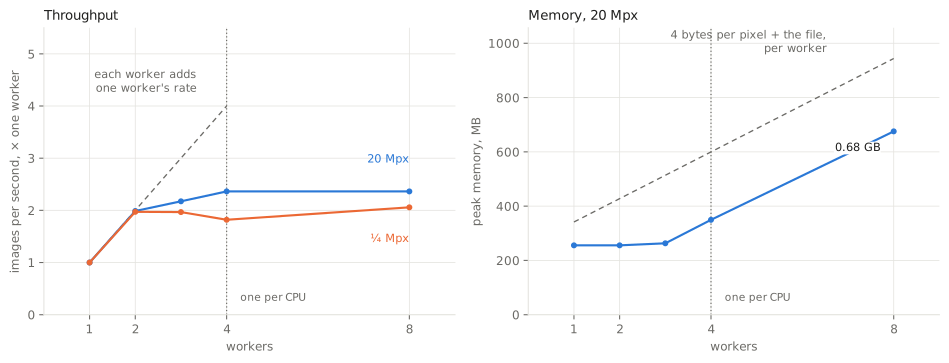
Here 4 workers, one per CPU, hash 2.4 times as many 20-megapixel images per second as one worker, and 8 workers 2.4 times; on quarter-megapixel images, 1.8 and 2.1 times.1
Small images and large ones scale alike. threads = 0 is the fastest setting where the
batch has the machine to itself; where several batches or other work run at once, their
workers add up, and each should be given its share explicitly.
The numbers behind the chart
ph_hash_files() with the four 64-bit hashes; 44 items of the 5477×3651 JPEG and 2000 of the 612×408 one (at least two per worker), the shortest of the runs. The peak is the process's highest resident memory; 255.6 MB of it is there before the batch.
| Workers | 5477×3651: images per second | × one worker | 612×408: images per second | × one worker | 5477×3651: peak memory |
|---|---|---|---|---|---|
| 1 | 7.3 | 1.00 | 914 | 1.00 | 256 MB |
| 2 | 14.5 | 1.99 | 1802 | 1.97 | 256 MB |
| 3 | 15.9 | 2.17 | 1797 | 1.97 | 263 MB |
| 4 | 17.3 | 2.36 | 1663 | 1.82 | 350 MB |
| 8 | 17.3 | 2.36 | 1880 | 2.06 | 676 MB |
How this was measured
site_stages batch hashes a batch whose items all name one file, with the four 64-bit
hashes, and reports the shortest run and the peak resident memory of its process. The
peak is a high-water mark of the whole process, so each worker count runs as a process
of its own. The file is the large example photograph at 20 megapixels and at a quarter
of one, as JPEG. Below is the code that ran, not a copy of it.
# A batch of one photograph's path, repeated: ph_hash_files() with the four 64-bit hashes,
# at every worker count from one to the CPUs the library counts for `threads = 0`, and at
# twice that; on the photograph at 20 megapixels and at a quarter of one, the shortest of
# five runs after a warm-up. Each run is a process of its own, as its peak memory is the
# process's high-water mark. The memory of a worker is measured once more on the
# 20-megapixel JPEG, PNG and WebP, at one worker and at one per CPU.
BATCH_SIZES = {20: 44, 0.25: 2000}  # megapixels: items in the batch
BATCH_RUNS = 5


def _batch(tool, path, threads, items, runs):
    out = subprocess.run([tool, "batch", path, str(threads), str(items), str(runs)],
                         check=True, capture_output=True, text=True).stdout
    data = json.loads(out)
    if "threads=on" not in data["build_info"]:
        raise SystemExit("site_stages batch: the library was built without threads")
    data["per_worker"] = (data["peak_after"] - data["peak_before"]) / data["workers"]
    return data


def measure_batch(tool):
    """{"machine": {...}, "cpus": n, "scaling": {mpx: [run per worker count]},
    "memory": {format: {"bytes": the file's size, "runs": [run at one worker, run at one
    per CPU]}}}, each run as `site_stages batch` prints it plus "per_worker", the
    growth of the peak divided by the workers; from the cache when nothing that decides
    them has changed."""
    host = machine()
    paths = sized_images()
    key = fingerprint(KEY_FILES, [tool] + sorted(paths.values()),
                      json.dumps(host, sort_keys=True))

    def measure():
        cpus = _batch(tool, paths[0.25, "jpeg"], 1, 1, 1)["cpus"]
        counts = list(range(1, cpus + 1)) + [2 * cpus]
        scaling = {}
        for mpx, items in BATCH_SIZES.items():
            scaling[str(mpx)] = [_batch(tool, paths[mpx, "jpeg"], t, max(items, 2 * t),
                                        BATCH_RUNS) for t in counts]
        memory = {}
        for fmt in FORMATS:
            path = paths[20, fmt]
            runs = [_batch(tool, path, t, 2 * t, 1) for t in (1, cpus)]
            memory[fmt] = {"bytes": os.path.getsize(path), "runs": runs}
        return {"machine": host, "cpus": cpus, "scaling": scaling, "memory": memory}

    return cached("timing-batch", key, measure, "batches")
/* The highest resident memory of this process so far, in bytes: a high-water mark that
 * never goes down, which is why every thread count of `batch` runs as a process of its
 * own. */
static long long peak_resident_bytes(void) {
    struct rusage ru;
    if (getrusage(RUSAGE_SELF, &ru) != 0) {
        return -1;
    }
#ifdef __APPLE__
    return (long long)ru.ru_maxrss; /* bytes on Darwin */
#else
    return (long long)ru.ru_maxrss * 1024; /* kilobytes on Linux */
#endif
}

/* site_stages batch <image> <threads> <items> <runs>: ph_hash_files() on `items` entries
 * that all name the image, with the four 64-bit hashes, once to warm up and then `runs`
 * times. Prints the shortest run in seconds, the workers it ran, the CPUs `threads = 0`
 * would use, and the peak resident memory of the process before the first batch and after
 * the last, with the build that ran them. Every item must succeed. */
int mode_batch(int argc, char **argv) {
    (void)argc;
    int threads = atoi(argv[1]), runs = atoi(argv[3]);
    long count = atol(argv[2]);
    if (threads < 1 || count < 1 || runs < 1) {
        return fail("threads, items and runs must be positive", argv[1]);
    }
    size_t n = (size_t)count;
    ph_batch_item_t *items = calloc(n, sizeof(*items));
    if (!items) {
        return fail("out of memory for", argv[2]);
    }
    for (size_t i = 0; i < n; i++) {
        items[i].path = argv[0];
    }
    long long before = peak_resident_bytes();
    double best = 0.0;
    for (int r = -1; r < runs; r++) { /* r = -1: the warm-up */
        double t0 = seconds();
        ph_error_t err = ph_hash_files(items, n, PH_HASH_FLAGS_ALL, threads);
        double t = seconds() - t0;
        for (size_t i = 0; i < n && err == PH_SUCCESS; i++) {
            err = items[i].status;
        }
        if (err != PH_SUCCESS) {
            free(items);
            return fail("batch failed on", argv[0]);
        }
        if (r == 0 || (r > 0 && t < best)) {
            best = t;
        }
    }
    free(items);
    json_t j = json_begin(stdout);
    json_string(&j, "build_info", ph_get_build_info());
    json_int(&j, "cpus", ph_available_cpus()); /* what threads = 0 would start */
    json_int(&j, "items", (long long)n);
    json_int(&j, "workers", (long long)((size_t)threads < n ? (size_t)threads : n));
    json_double(&j, "seconds", best);
    json_int(&j, "peak_before", before);
    json_int(&j, "peak_after", peak_resident_bytes());
    json_end(&j);
    return 0;
}
Memory
A worker holds one image at a time. While an item is loaded and hashed, that is its decoded pixels, 3 bytes each, their grayscale copy, 1 byte each, and the encoded file, mapped or read while it is decoded. The previous item's image is freed before the next load. A worker's share of the peak is about four bytes per pixel plus the file, as measured:
The 5477×3651 photograph, two items per worker. A worker's share is the growth of the process's peak resident memory over the batch, divided by the workers.1
| Format | File | 4 bytes per pixel + the file | Per worker, 1 worker | Per worker, 4 workers |
|---|---|---|---|---|
| JPEG | 6.1 MB | 86 MB | 0 MB | 23 MB |
| PNG | 22.8 MB | 103 MB | 0 MB | 40 MB |
| WebP | 5.9 MB | 86 MB | 0 MB | 23 MB |
The peak of a batch is therefore about the number of workers times four bytes per pixel of its largest images, and grows by the same amount for every worker added, past one per CPU as well. An image with an EXIF orientation other than upright holds a second copy of its pixels while it is turned, 6 bytes per pixel for that moment. A buffer batch holds no file per worker, since the buffers are the caller's.
The bound that matters is the largest image the batch may meet. At the default size limit of
256 Mi pixels, one worker may hold about 1 GiB, and threads = 0 on a machine with 64 CPUs
may hold 64 GiB. Three settings lower it:
- An explicit thread count, which bounds the number of images held at once.
- A lower size limit on the template
(
ph_context_set_max_pixels()), which refuses a larger image withPH_ERR_IMAGE_TOO_LARGEbefore its pixels are allocated. - A reduced decode scale on the template
(
ph_context_set_decode_scale()): a JPEG decoded at ½ of its width and height holds a quarter of its pixels. It changes the hashes (Decoding at a reduced scale).
How the estimate is computed
What an item costs
An item costs its load and its hashes, and both grow with the pixels of the source image, not with the size of the hash; Performance has the times by image size and format, and Choosing an algorithm by algorithm. Two settings on the template make every item cheaper:
- A reduced decode scale, for JPEG, as above.
- Loading as grayscale
(
ph_context_set_load_grayscale()): the four hashes a batch computes are grayscale hashes, so a batch never needs the color. It can move a hash, as the decoder's grayscale differs from the library's (Loading as grayscale).
Making it cheaper has what each saves on a 20-megapixel JPEG. A single image is never split across threads; the reason is in One image, one thread.
Threads: what is safe
- One context per thread. The library is safe to call from any number of threads at once
as long as each thread uses its own
ph_context_t. One context shared between threads is not safe, not even for two threads that only read it. A batch follows the same rule: each worker owns its context. - Batch calls take no context, so several threads may each run a batch at the same time. Each call starts its own pool, so their worker counts add up.
- The template is read once, on the calling thread, before any worker starts. Another thread must not change it while a batch call is starting.
- The callbacks run on the worker threads, several at a time.
In code
The example hashes the files on its command line with dHash and pHash. Without arguments
besides the files, it uses ph_hash_files_ex() with a template that decodes JPEGs at half
size, four workers, a progress line per file and Ctrl-C to stop; with --defaults, the plain
ph_hash_files(). A JPEG hashes differently the two ways, since half the pixels make
another image.
/* Hashes many files at once on a pool of worker threads, with a per-file status. By
 * default through ph_hash_files_ex(): a configuration template, a progress line, and
 * Ctrl-C to stop. With --defaults, through the plain ph_hash_files(), which hashes every
 * file as a freshly created context would. Build/run:
 *   cc batch_hash.c -o batch_hash $(pkg-config --cflags --libs libphash)
 *   ./batch_hash [--defaults] a.jpg b.png c.webp ...
 */
#include <libphash.h>
#include <signal.h>
#include <stdatomic.h>
#include <stdio.h>
#include <stdlib.h>
#include <string.h>

/* Set by Ctrl-C and read by the workers. A signal handler may store to a lock-free atomic,
 * and an atomic needs no lock between threads. */
static atomic_int stop_requested;

static void on_interrupt(int sig) {
    (void)sig;
    atomic_store(&stop_requested, 1);
}

/* Called on the worker threads before each item; returning 0 stops the batch. */
static int should_continue(void *user_data) {
    (void)user_data;
    return !atomic_load(&stop_requested);
}

/* Called on the worker threads after each item, possibly several at once: it only reads
 * its arguments and writes one line, so it needs no lock. */
static void on_progress(size_t done, size_t total, void *user_data) {
    (void)user_data;
    fprintf(stderr, "%zu/%zu done\n", done, total);
}


int main(int argc, char **argv) {
    int defaults = argc > 1 && strcmp(argv[1], "--defaults") == 0;
    char **paths = argv + 1 + defaults;
    size_t n = (size_t)(argc - 1 - defaults);
    if (n == 0) {
        fprintf(stderr, "usage: %s [--defaults] <image>...\n", argv[0]);
        return 1;
    }

    /* One item per file: the path in, the hashes and a status out. */
    ph_batch_item_t *items = calloc(n, sizeof(*items));
    if (!items) {
        return 1;
    }
    for (size_t i = 0; i < n; i++) {
        items[i].path = paths[i];
    }
    /* hashes[] holds one value per flag, in ascending bit order: dHash, then pHash. */
    uint32_t flags = PH_HASH_DHASH | PH_HASH_PHASH;

    ph_context_t *config = NULL;
    ph_error_t err;
    if (defaults) {
        /* Every file as a freshly created context hashes it, on one worker per CPU this
         * process may use; the call returns after the last file. */
        err = ph_hash_files(items, n, flags, 0);
    } else {
        /* The template context: every worker copies its configuration. Here, images up
         * to 50 megapixels and JPEGs decoded at half size: cheaper on large photos, and
         * other hashes than the defaults give, in a build whose JPEG decoder is
         * libjpeg-turbo. */
        if (ph_create(&config) != PH_SUCCESS ||
            ph_context_set_max_pixels(config, 50u * 1000u * 1000u) != PH_SUCCESS ||
            ph_context_set_decode_scale(config, PH_DECODE_SCALE_HALF) != PH_SUCCESS) {
            fprintf(stderr, "could not set up the configuration\n");
            ph_free(config);
            free(items);
            return 1;
        }

        ph_batch_options_t options;
        if (ph_batch_options_init(&options) != PH_SUCCESS) {
            ph_free(config);
            free(items);
            return 1;
        }
        options.config = config;
        options.threads = 4; /* four workers at most, and so four decoded images */
        options.should_continue = should_continue;
        options.on_progress = on_progress;

        signal(SIGINT, on_interrupt);
        err = ph_hash_files_ex(items, n, flags, &options);
    }

    if (err != PH_SUCCESS && err != PH_ERR_CANCELLED) {
        /* The batch as a whole failed (bad arguments, no memory for the pool). */
        fprintf(stderr, "batch failed: %s\n", ph_get_error_string(err));
        ph_free(config);
        free(items);
        return 1;
    }

    /* A file that could not be read or decoded fails on its own; the others are hashed.
     * After a cancellation, the files never started carry PH_ERR_CANCELLED. */
    int failed = 0, skipped = 0;
    for (size_t i = 0; i < n; i++) {
        if (items[i].status == PH_SUCCESS) {
            char dhex[17], phex[17];
            if (ph_hash_to_hex(items[i].hashes[0], dhex, sizeof(dhex)) == PH_SUCCESS &&
                ph_hash_to_hex(items[i].hashes[1], phex, sizeof(phex)) == PH_SUCCESS) {
                printf("%s  dHash %s  pHash %s\n", items[i].path, dhex, phex);
            }
        } else if (items[i].status == PH_ERR_CANCELLED) {
            skipped++;
        } else {
            printf("%s  %s\n", items[i].path, ph_get_error_string(items[i].status));
            failed++;
        }
    }
    printf("%zu hashed, %d failed, %d not started\n", n - (size_t)(failed + skipped), failed,
           skipped);

    ph_free(config);
    free(items);
    return 0;
}
-
Measured when this site was built, on Intel(R) Xeon(R) Platinum 8370C CPU @ 2.80GHz, 4 cores, Linux x86_64; compiled by 13.3.0, optimized, with libjpeg-turbo decoding the JPEGs: the minimum of at least five runs after a warm-up. What each time covers, and the code, are under “How this was measured” beside it. ↩↩